Today I Learned

Small things I picked up along the way, one at a time.

2025

vite-plugin-validate-env

validate environment variables at build or dev time

I sometimes put stringified JSON and has bunch of env variable keys. It’s hard to know when there’s an issue within the env value unless we really understand the whole env vars we define and where its used beneath the app.

Astro v5 has env validator built in. t3-env lib also serves this purpose. It’s also possible to write custom validator and run it as custom script.

I look for seamless validation on my vite app and glad that there’s a vite plugin for it: @julr/vite-plugin-validate-env. It runs on dev & build time only and support zod.

2024

Expo Env Load Behavior

Dev server, EAS Build, and EAS Updates

Expo has different behavior on how it loads env variables on dev server, EAS Build, and EAS Updates

More info

React isValidElement

to check whether a value is React Element

TypeScript
import * as React from 'react';

type SomeComponentProps = {
  description: React.ReactNode;
}

const ComponentProps = ({ description }: SomeComponentProps) => {
  if (React.isValidElement(description)) {
    return description;
  }

  return (<Paragraph>{description}</Paragraph>);
}

References: https://react.dev/reference/react/isValidElement

2023

TypeScript: Function Overloads

specify a function that can be called in different ways and multiple return type

We can define multiple function declarations to define different signatures (parameters/return types) and TypeScript will infer the right signature based on call arguments.

Some gotchas:

  • Implementation should narrow types based on overload
  • Order matters: put most specific overloads first

Use Cases:

  • Reusable functions with different types
  • Library functions mimicking overloads
  • Gradual typing - multiple signatures

Example:

TypeScript
// Overloads
function getString(opts: { fallback: string }): string;
function getString(opts: {}): string | undefined;

// Implementation
function getString(opts: {}): string | undefined {
  // ...
}

// Usage
const str1 = getString({ fallback: "hello" }); // string
const str2 = getString({}); // string | undefined

References: TypeScript Handbook

vite-tsconfig-paths

resolve imports using TypeScript's path mapping.

I used to manually define how to resolve import through vite config resolve even though I already define path mapping in tsconfig.json. By using this plugin, it will read the tsconfig path mapping.

References: https://www.npmjs.com/package/vite-tsconfig-paths

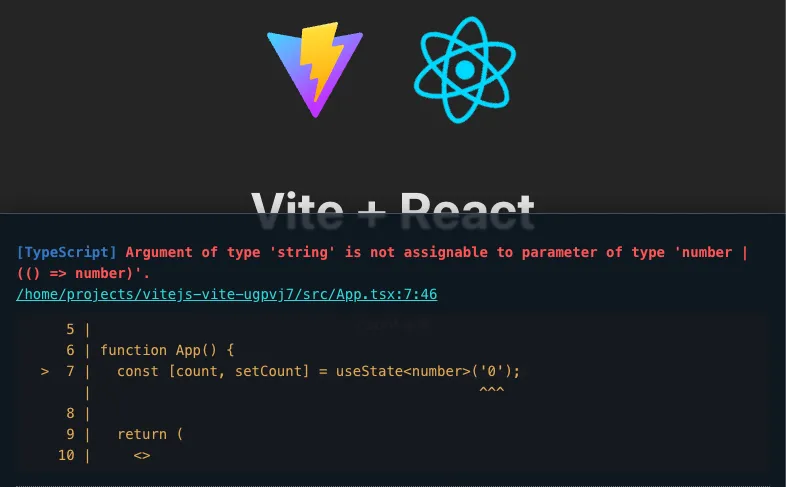
vite-plugin-checker

Add type checking and linting support for vite

vite-plugin-checker preview

I was looking for how to improve my vite react project by showing type-check or lint error like CRA’s error overlay. Then I found a plugin called vite-plugin-checker. The configuration is pretty straightforward.

References: https://vite-plugin-checker.netlify.app/

Zod refine or superRefine check

refine and superRefine check run after there's no invalid type error anymore in the base schema.

I sometimes got stuck when doing validations through refine or superRefine. Turns out refine and superRefine checking is run after there’s no more invalid type error on the base schema. It’s kinda expected but idk why is this not documented well.

FlutterShark

How to Detect if an App is Built Using Flutter

[Android OS] FlutterShark able to detect and list down which app being installed in device are built using flutter. It will give these informations:

  • Flutter SDK version
  • Dart SDK version
  • Packages being used

2022

2021

Search